Laxland — Free Hotel & Hospitality Website Template
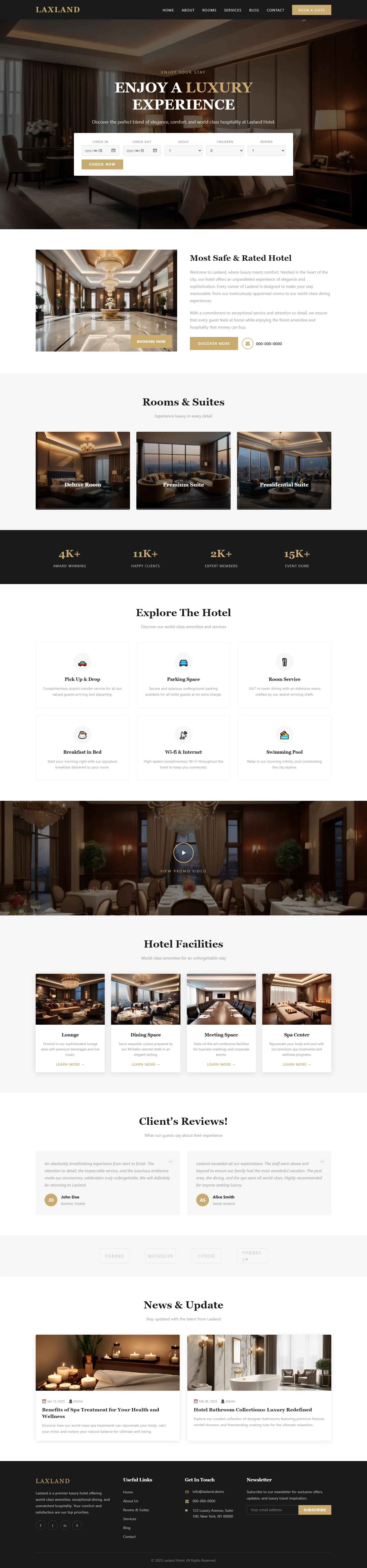
Laxland is a free HTML5 hotel template built with Tailwind CSS and vanilla JavaScript. It includes 7 pages covering about, contact, dining, gallery, index, a branded landing page, and rooms. The homepage features section headings for luxury experiences, room and suite showcases, property exploration, facilities, guest reviews, and news updates.
The template uses hand-written CSS and local images for fast, clean rendering without heavy animation libraries. Its structure supports straightforward customization while maintaining a responsive layout suitable for hospitality websites.
Key Features
- Mobile-First Booking Engine Integration
- Local Experience Highlight Carousel
- Dynamic Pricing Display Module
- Guest Review Schema Markup
| Tech Stack | HTML5, Tailwind CSS, JavaScript |
| Release Date | 2026-07-05 |
| License | Free (Must keep footer backlink) |
Suitable For & Use Cases
Digital marketing managers running paid campaigns for boutique hotels or vacation rentals; front-end devs building static site generators for hospitality clients; SaaS platforms needing embeddable booking widgets. Especially useful for agencies managing multi-property portfolios across cities like Austin or Bali. Not suited for full-service resort chains requiring complex CRS integrations or property management systems beyond basic CRUD operations.
Page Sections Included
The index page contains six sections: an ENJOY A LUXURY EXPERIENCE hero area, a Rooms & Suites listing, an Explore The Hotel overview, a Hotel Facilities showcase, a Client Reviews testimonial block, and a News & Update content area. In addition to the homepage, the package includes standalone About, Dining, Gallery, and Contact pages, plus a dedicated laxland.html landing page, forming a complete multi-page hotel site across seven HTML files.
Why We Recommend
Laxland’s clean conditional content blocks let developers swap seasonal sections without hunting through nested markup. The hand-written CSS keeps the codebase readable, and the Vanilla JavaScript approach means no jQuery dependencies. It’s a solid foundation for hotels wanting a fast, maintainable site.
Technical Specifications
Built with HTML5, Tailwind CSS, and vanilla JavaScript. Requires a CSS build step for production optimization. No external libraries are needed for core functionality. Developers should compile styles using the Tailwind CLI and customize colors, fonts, and spacing through the config file.
Ideal Use Case
Ideal for independent boutique hotels, beachfront resorts, and restaurant venues needing a straightforward booking showcase. The dedicated dining and gallery pages suit properties highlighting local experiences, events, or on-site amenities without requiring complex backend integrations.