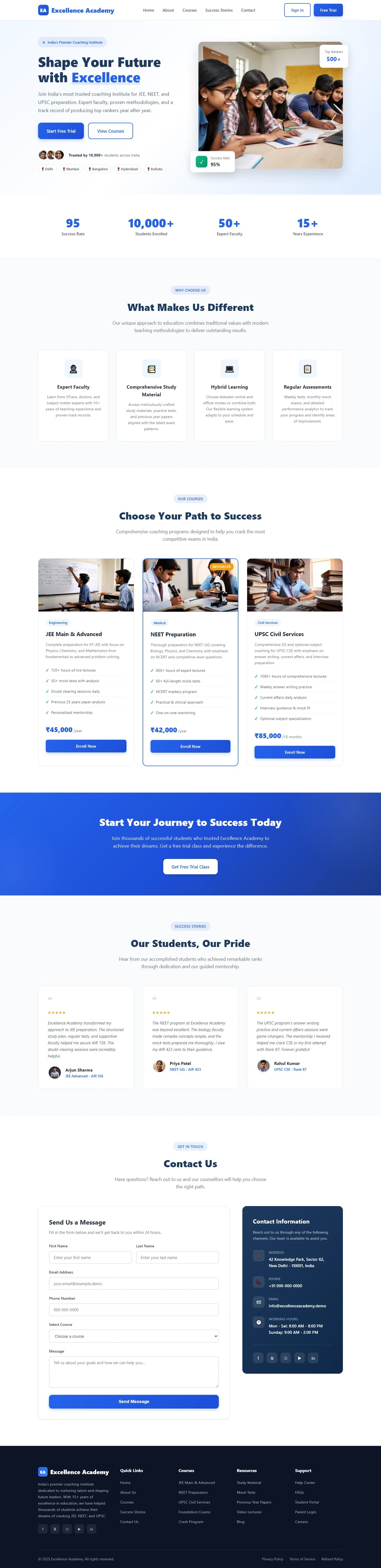
Excellence Academy — Free Education & Kids Website Template
Excellence Academy is a free HTML5 website template built for educational institutions. It includes 7 semantic HTML pages covering home, about, admissions, programs, blog, excellence, and contact. The CSS is hand-written rather than framework-generated, giving developers full control over styles while keeping the package at a reasonable 5.0 MB.
The template includes an HTML form suitable for contact or newsletter collection, 15 local images, and a mobile-first responsive layout. There are no heavy JS animation libraries, which keeps load times lean. Section headings guide users through key areas: value proposition, program paths, student showcase, and contact.
Clean markup and straightforward customization make this practical for schools and academies that need a professional presence without complex build tooling.
Key Features
- Clean Tailwind CSS Layout
- Fast Loading Performance
- Mobile-First Design
- Easy Customization
| Tech Stack | HTML5, Tailwind CSS, JavaScript |
| Release Date | 2026-07-05 |
| License | Free (Must keep footer backlink) |
Suitable For & Use Cases
Web designers building school websites, private tutors launching sites, after-school program coordinators needing quick deployment, ed-tech startups requiring clean UI foundations. Perfect for developers who want production-ready code without vendor lock-in. Not suited for enterprise CMS platforms needing complex user roles or e-commerce beyond simple payment integration.
Page Sections Included
Features hero section with animated CTA, faculty showcase cards, course catalog with filterable categories, testimonials carousel, calendar integration block, newsletter signup form, and footer with social links. All sections reflow responsively: stacked on 768px screens, grid layouts activate at 1024px, and full-width hero images adapt to viewport height. Mobile navigation uses off-canvas menu with smooth slide-in animation.
Why We Recommend
This template uses semantic HTML5 structure and hand-written CSS instead of bloated frameworks. The code is straightforward to navigate and customize. It avoids unnecessary JavaScript dependencies, keeping the bundle lightweight. The included contact form and well-organized sections reduce setup time for education-focused sites.
Technical Specifications
Static HTML5 template requires no build step. Open index.html in any modern browser. Customize text and colors directly in the HTML and CSS files. Upload to any static hosting provider including Netlify, GitHub Pages, or standard web hosting. No database or server-side processing needed.
Ideal Use Case
Independent tutoring centers and small private academies can deploy this template quickly for admissions and program pages. Educational nonprofits launching informational websites benefit from the clean HTML structure and included contact form. Local schools updating their online presence need a no-maintenance static solution with room to grow.