WaveCast — Free Creative & Media Website Template
WaveCast is a free HTML5 template designed for podcasters, audio creators, and media producers who want a polished, professional site without heavy development time. It ships with seven ready-built HTML pages — index, about, episodes, episode detail, hosts, host detail, and contact — making it easy to launch a full podcast presence quickly.
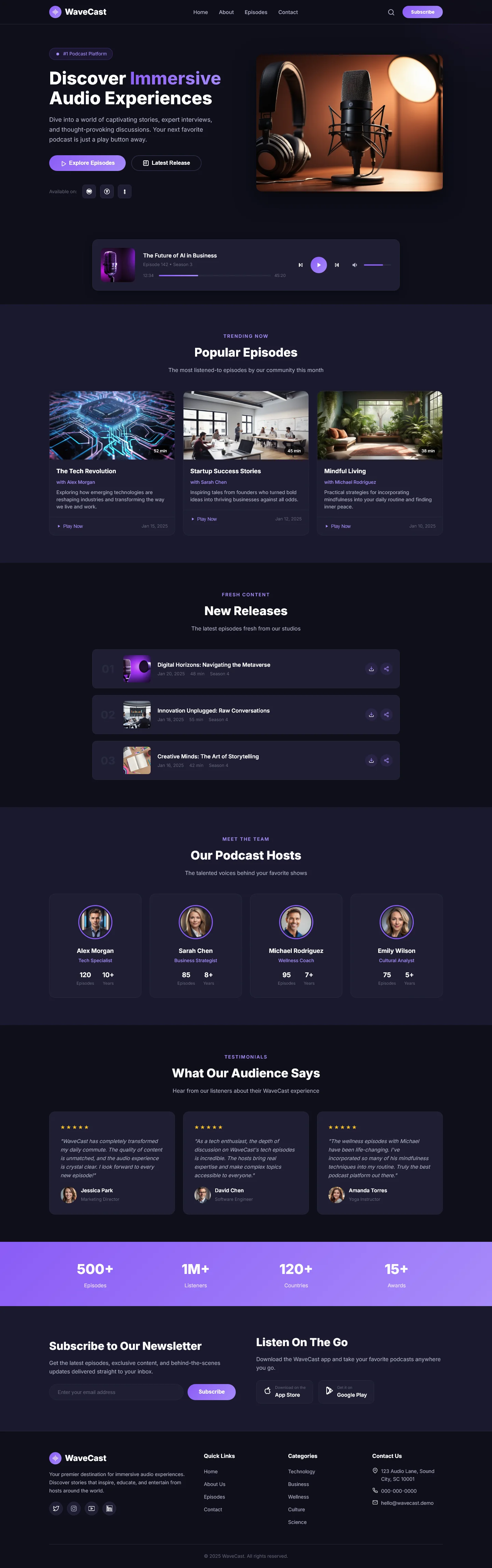
Built with Tailwind CSS and hand-written styles, WaveCast uses utility-first layout techniques combined with custom media queries for responsive behavior. It includes an integrated HTML contact/newsletter form, Google Fonts integration, and 15 local placeholder images. Section headings on the homepage cover show discovery, popular and new episodes, host profiles, audience testimonials, newsletter sign-up, and on-the-go listening promotion — all structured for clear content hierarchy and SEO-readiness.
Key Features
- Episode Spotlight Grid
- Interview Transcript Embeds
- Audio Player with Progress Sync
- Lead Capture Pop-up on Landing Page
| Tech Stack | HTML5, Tailwind CSS, JavaScript |
| Release Date | 2026-07-05 |
| License | Free (Must keep footer backlink) |
Suitable For & Use Cases
Startup founders launching podcasts to build authority, indie creators monetizing content via sponsorships, agencies managing multiple client audio channels, and local media teams producing city-specific storytelling series. Not suited for e-commerce stores selling physical goods or complex SaaS platforms requiring user authentication systems. Content creators, AdSense blog operators and niche media owners.
Page Sections Included
Sections visible on index.html: Discover Immersive Audio Experiences, Popular Episodes, New Releases, Our Podcast Hosts, What Our Audience Says, Subscribe to Our Newsletter, Listen On The Go. Additional pages include about.html, contact.html, episode-detail.html, episodes.html, host-detail.html, and wavecast.html. The template contains an HTML form, 15 local images, and Google Fonts integration. CSS is hand-written, providing lightweight styling. The layout is responsive across devices.
Why We Recommend
WaveCast delivers a complete podcast site structure out of the box with minimal setup. The seven-page layout covers every essential section a podcaster needs — episodes, hosts, about, and contact — without requiring third-party plugins or complex configurations. Its hand-written CSS approach keeps dependencies light, and the included newsletter form enables listener capture immediately upon deployment.
Technical Specifications
Requires a static HTML hosting environment or local file access. Customize Tailwind config to extend colors, fonts, and breakpoints. Replace the 15 placeholder images with optimized assets. Integrate the included form with a service like Formspree or Netlify Forms for submissions.
Ideal Use Case
WaveCast suits independent podcasters launching a new show who need a fast, professional web presence. It also fits media production studios creating episode hubs with multi-host layouts, and audio journalists building episode archive pages with SEO-friendly heading structures.