Briel — Free Real Estate & Construction Website Template
Briel is a free HTML5 template built with Tailwind CSS and hand-written CSS, designed for real estate and construction businesses. It includes seven dedicated HTML pages covering about, blog, contact, index, projects, and services. The template uses CSS Grid and Flexbox for responsive layouts that adapt cleanly across viewports.
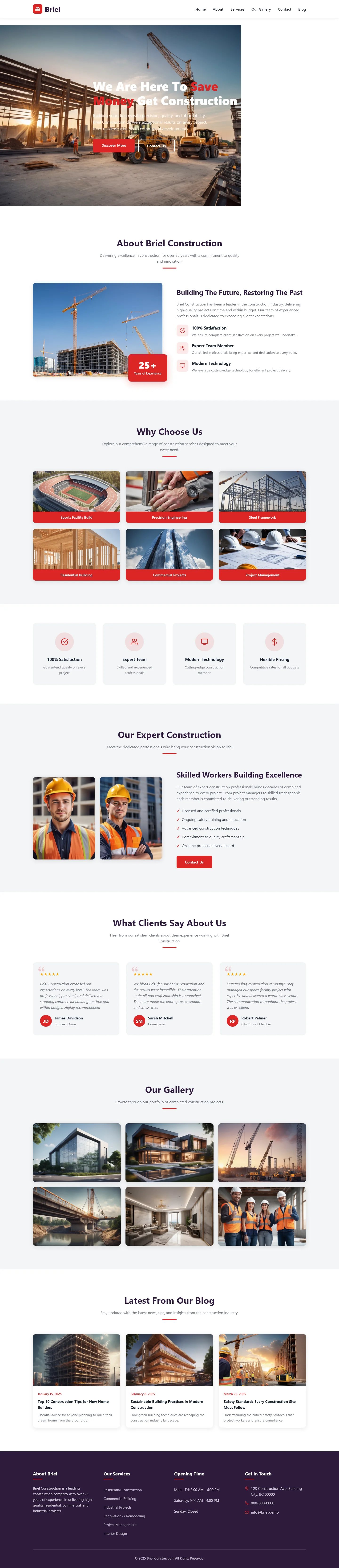
A contact or newsletter form is included for lead capture. Local image assets total 24 files, and no notable JavaScript animation libraries are used. Section headings on the homepage include hero, about, why choose us, expert construction, testimonials, gallery, and blog.
With a package size of approximately 1.7 MB, Briel balances visual structure with straightforward customization.
Key Features
- Residential Construction
- Commercial Builds
- Quality Craftsmanship
- Affordable Building
| Tech Stack | HTML5, Tailwind CSS, JavaScript |
| Release Date | 2026-07-05 |
| License | Free (Must keep footer backlink) |
Suitable For & Use Cases
UI/UX designers building construction firm websites, freelance contractors managing portfolios, small real estate agencies needing quick launch sites, and tech-savvy homeowners documenting renovation projects. Ideal for teams using Figma + GitHub workflows. Not suited for e-commerce stores selling physical products or membership-heavy platforms requiring user authentication systems.
Page Sections Included
The template features a hero headline, an About Briel Construction introduction, a Why Choose Us section, an Our Expert Construction overview, a testimonials area labeled What Clients Say About Us, an image gallery, and a Latest From Our Blog section. These headings appear on the index page and follow a clean vertical layout.
Why We Recommend
Briel delivers a clean, production-ready structure without unnecessary complexity. The Tailwind CSS foundation makes spacing and color adjustments intuitive, and the section layout follows a logical flow suited to construction and real estate portfolios. With no heavy animation libraries and a contained file size, it offers a reliable starting point for teams that want fast iteration over bloated frameworks.
Technical Specifications
Built with HTML5, Tailwind CSS, and vanilla JavaScript. Configure Tailwind utility classes in the config file, and compile with the Tailwind CLI. Includes an HTML contact/newsletter form and 24 local images. No build framework required beyond standard CSS tooling.
Ideal Use Case
This template fits construction companies, architectural firms, and real estate developers launching a lightweight portfolio site. It works well for contractors needing a contact form with a service showcase, or local builders who want a responsive blog and project gallery without custom backend development.