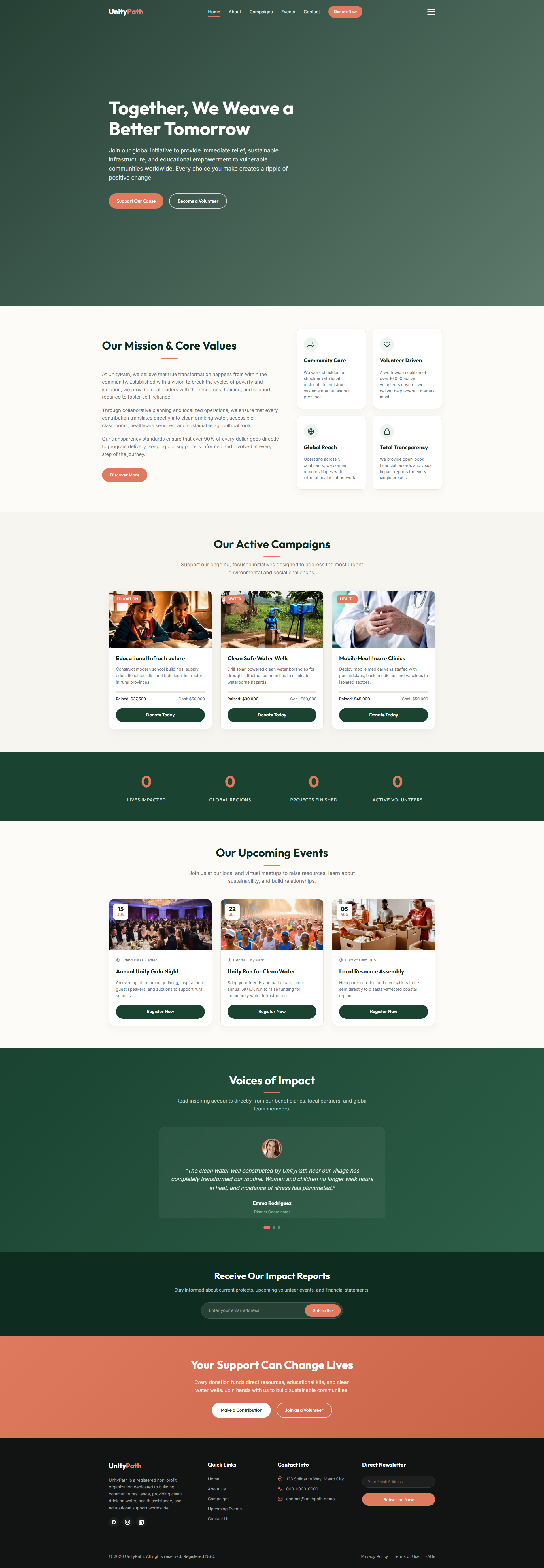
UnityPath — Free Nonprofit & Charity Website Template
UnityPath is a free HTML5 website template built with Tailwind CSS, designed specifically for nonprofits and charity organizations. The package contains five core pages including about, campaigns, contact, events, and index, all structured with hand-written CSS for clean, maintainable code. The template includes an HTML contact and newsletter form, utilizes 24 local images, and features a clear section hierarchy with headings like "Together, We Weave a Better Tomorrow" and "Our Active Campaigns." This layout supports straightforward storytelling and donor engagement without relying on external animation libraries.
The template's structure is organized to guide visitors through mission, campaigns, events, and impact stories, making it suitable for charitable groups needing a professional, content-focused site. With its utility-first Tailwind foundation, teams can easily adjust visual styling through configuration files while preserving a responsive, mobile-friendly framework.
Key Features
- Community Impact Dashboard
- Donation Journey Optimizer
- Localized Resource Finder
- Event Registration Hub
| Tech Stack | HTML5, Tailwind CSS, JavaScript |
| Release Date | 2026-07-05 |
| License | Free (Must keep footer backlink) |
Suitable For & Use Cases
Ideal for nonprofit directors, community outreach managers, and small charity founders who need a fast, professional site to run local relief drives or educational programs. Also fits social enterprises aiming to brand their mission-driven work. Not suited for e-commerce stores selling physical products or SaaS platforms needing complex user dashboards.
Page Sections Included
The template includes five HTML pages: index.html, about.html, campaigns.html, events.html, and contact.html. The homepage features sections titled Together We Weave a Better Tomorrow, Our Mission Core Values, Our Active Campaigns, Our Upcoming Events, Voices of Impact, and Your Support Can Change Lives. It contains a hand-written CSS approach with 24 local images and an HTML form for contact or newsletter purposes.
Why We Recommend
UnityPath provides a straightforward, lightweight foundation for charity websites using hand-written CSS and Tailwind's utility classes. Its five-page structure and donation-focused sections align well with nonprofit goals. The absence of heavy animation libraries keeps the bundle size minimal, and the clear layout helps development teams customize content efficiently without advanced front-end expertise.
Technical Specifications
Requires Node.js v16+ and npm. Configure Tailwind via tailwind.config.js for custom branding and colors. Use postcss-preset-env for compatibility. Build production styles with npx tailwindcss build -o output.css. Optimize deployment through static generators like Vite or Next.js for improved performance.
Ideal Use Case
Ideal for local charities, community fundraisers, and nonprofit organizations that need a structured site to showcase missions, upcoming events, and active campaigns. The template supports straightforward content updates and integrates a contact/newsletter form for donor engagement, making it suitable for teams managing volunteer efforts or regional fundraising drives.




