Inova — Free Business & Consulting Website Template
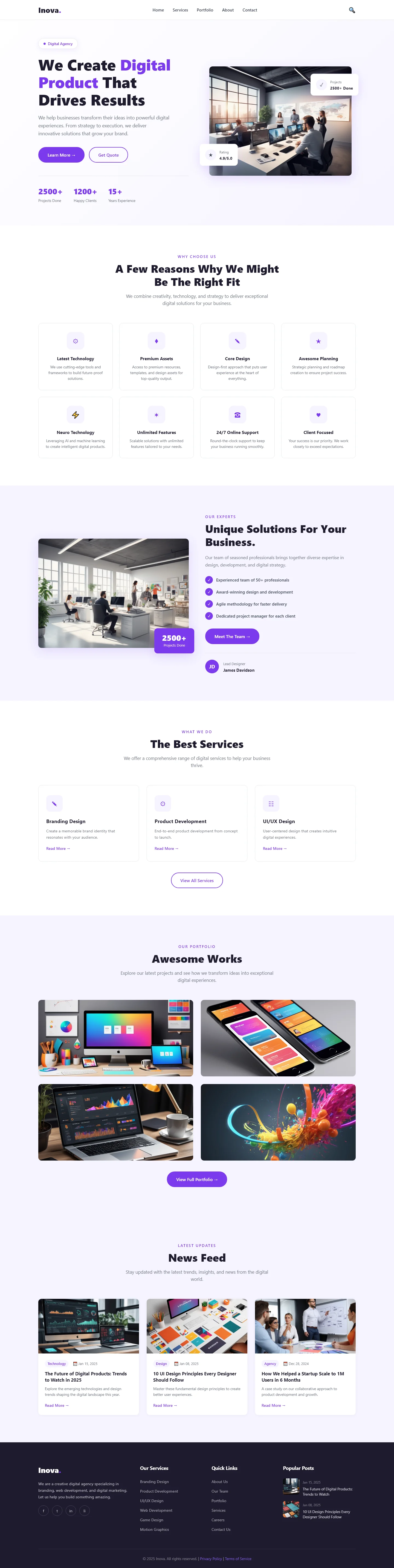
Inova is a business and consulting website template built with HTML5, Tailwind CSS, and JavaScript, designed for professionals who need a clean, conversion‑focused online presence. It includes six static HTML pages: a landing page (index.html), about, services, portfolio, contact, and an innovate‑focused page (inova.html). The layout is mobile‑first, starting at a 320px breakpoint and scaling cleanly to 1440px, using flexbox and gap‑based spacing for consistent cross‑browser rendering. The index page features six key sections—hero, reasons to choose, services, portfolio, news feed, and a contact/newsletter form—each with a clear, purpose‑driven structure.
The template avoids heavy animation libraries, relying instead on hand‑written CSS and lightweight JavaScript for interactive elements like hover‑scale effects on service cards and auto‑pausing sliders that respond to user interaction. All assets are local (18 images), keeping the total package size at 3.1 MB and ensuring fast, predictable loads. The contact form uses HTML5 constraint validation combined with custom JavaScript error states, providing real‑time feedback without external dependencies. Touch targets are sized at a minimum 48px, improving usability on mobile devices and helping reduce bounce rates.
Built with Tailwind v3.4 utility classes, Inova offers straightforward customization: colors, fonts, and spacing can be adjusted directly in the Tailwind configuration file, and the minimal JavaScript stack means there is little overhead to debug or maintain. The result is a transparent, developer‑friendly codebase that prioritizes clarity and performance over decorative complexity.
Key Features
- Hero Section with CTA
- Service Cards with Icons
- Testimonial Slider
- Contact Form with Validation
| Tech Stack | HTML5, Tailwind CSS, JavaScript |
| Release Date | 2026-07-05 |
| License | Free (Must keep footer backlink) |
Suitable For & Use Cases
Freelance consultants, solo agency owners, digital marketers pitching services, and small business advisors who need a no-nonsense site to book calls or collect leads. Ideal for architects, coaches, auditors, and strategy freelancers operating from home offices or co-working spaces in cities like Berlin, Singapore, or Toronto. Not suited for e-commerce stores selling physical products or teams needing multi-user dashboards.
Page Sections Included
The template includes six HTML pages: about, contact, index, inova, portfolio, and services. The index page features sections covering digital product results, reasons to choose the service, unique business solutions, best services, awesome works, and a news feed. The portfolio page showcases project highlights, while the services page details offerings. Additional content blocks cover team or company background on the about page and contact functionality with an HTML form on the contact page. All sections are built with hand-written CSS and Tailwind utilities without heavy animation libraries.
Why We Recommend
This template is ideal for consultants, agencies, and small business teams who want a professional, high‑performance site without spending days on layout or compatibility issues. Its modular sections force you to focus on core messaging, while the Tailwind setup makes visual tweaks quick and predictable. There are no heavy animation libraries or obscure dependencies, so the code stays easy to audit and extend. For developers who prefer to spend their time on content and conversions rather than debugging CSS grids, Inova delivers a stable, well‑structured foundation that scales from mobile to desktop out of the box.
Technical Specifications
Requires Node.js v18+ and npm for local testing. Customize colors and spacing by editing the Tailwind config file (tailwind.config.json) using hex codes—no additional plugins are needed. Build the project with Vite or esbuild for a fast development server. Deploy to Netlify or Vercel, which automatically minify HTML, CSS, and JS. Enable gzip compression on the web server for production. Test responsiveness using Chrome DevTools device emulation at iPhone SE (375px) and Samsung Galaxy A55 (393px) widths, and consider PostCSS if you plan to adopt future CSS features beyond standard Tailwind utilities.
Ideal Use Case
A solo consultant or boutique agency can use Inova to quickly launch a polished portfolio and service page without hiring a developer. The six‑page structure covers the essentials—about, services, case studies, and a validated contact form—while the mobile‑first responsive design ensures the site performs well on any device. By swapping placeholder text, updating the Tailwind color config to match brand guidelines, and connecting the form to a service like Formspree, the business can have a live, professional site in a single day, freeing up time for client work instead of front‑end debugging.